Posts

Excel 4

Image
  We need to obtain the same tables than in the other experiment but we are going to use a different method. We place the cardboard at a stable point so that the friction is measured at the same angle. We compile the data from the different experiments into 16 tables and insert a graph for each table. We use these averages to complete the table, and finally, we create a graph showing how the experiment turned out.

Excel 3

Image
The inclined plane movement. You will calculate the coefficient of friction between to surfaces using the mobile phone as your instrument to take measurements. When we have the measures we put a graphic for each table of experiments and put the data when the mobile starts to move in a table with all the data. Later we calculate the averages and the error.

Excel 2

Image
In this activity we measure angles and calculate the values of the table. Finally with a function we calculate the error of the angle we measure.

Excel 1

Image
  In this activity we put values and with this numbers, we calculate the funtions of the table.

FINAL GIMP

Image
 This is the final project with pictures of all the class:

GIMP 006

Image
MOSAIC OF PHOTOS WITH COLOUR EFFECTS These are the photos that I choose:  The final project:

GIMP 005

Image
  Here is the original photo: Here is the final result of the lilas image: First I choose a nice image. Then, in gimp I open the photo and duplicated the layer and change one of this layer to black and white. When I have this, with the scissors select tool I select the parts I want to stay in color. Later, I click in the middle of the part selected and I go to select, invert and delate. Finally I save the photo as png.

Gimp 004

Image
-The initial photos of my project are: -Here is a photo of ercilla museum that I do: First I choose all the images I want to put, the ercilla photo and the paints. In gimp I open the ercilla photo and as new layer the paints. With the perspective tool I put correctly in the wall and the same with the text. The paint behind the glass you need to put right perspective, duplicate the layer and delate the parts that you want to show. Finally save as jpg and put in educamos and in the blog.

GIMP 003

Image
 -Original photos: - Here is the modificated photo: First I choose the landcape I want to do, and also the animals. When I open the document, I add the animals by opening new layer. With the fuzzy select tool, I delate the background of the animal images and I put in a correct place. Finally I save the image in xcf and jpg.

GIMP 002

Image
Working with layers:   Ex 69: three versions of a document with aspect ratio 1:1 and 16:9. Ex 70: here is the document in png. Final result:

GIMP 001

Image
  Original brugges image: Change brugges photo: First you need to choose and image. When you have the photo, you open it in gimp. With the crop tool you change the perspective, rotate the image and crop it. Later you have to clone the image you delate one part of the image. When you finish all, you need to export as jpg and xcf.

Inkscape images flags and stamp

Image
 -Swedish flag -European flag -Senegal flag I do this three flags with InkscapePortable. To do the Swedish flag i see a video that my teacher do to explain how to do step by step. The European flag i follow a document that explain how to do it. Finally i chose senagal flag to do by my self. -Tulip stamp

Digital image proporties

Image

Cloud security

Image
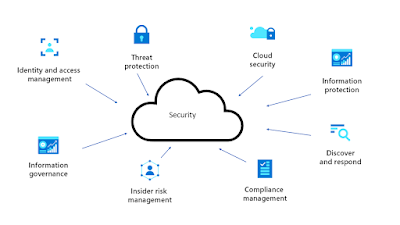
Cloud security refers to cybersecurity policies, best practices, controls and technologies used to protect applications infraestructure, and data in cloud environments. Cloud computing  is the availability of on-demand computing resources (such as storage and infrastructure) as services over the Internet. It eliminates the need for people and businesses to manage their own physical resources and pay only for what they use. Here are examples of different types of security for your cloud security: Here is a link that have good information of what cloud security is and also solutions to take for prevent this problems: https://www.exabeam.com/explainers/cloud-security/cloud-security-solutions-8-solution-categories-you-must-know/ By taking some preventions taking to have less cases of people that have hacked and lose their data, you mind be interest on these tips. S ome good tips to prevent are: -Requires Secure Passwords: Use the longest password and mix letters, numbers and symbols....

Phishing attacks

Image
Phishing attacks use fraudulent emails, text messages, phone calls, or websites to trick people into sharing sensitive data, downloading malware, or exposing themselves to cybercrime. This is  a technique used by cybercriminals to obtain personal and banking information from users by impersonating a legitimate entity, such as a bank, a social network, a public entity. Here is a diagram that explains very good: Here is a link with good information about what phishing attacks are and also the solutions taken to prevent this problems: https://www.cloudflare.com/es-es/learning/access-management/phishing-attack/   Although there are prevention measures, there are still several users who are scammed. People are becoming increasingly aware of not falling for these scams and ensuring their safety and protection. Some good tips to avoid or solve the problem: -Phishing simulations with AI:   Teach employees the skills necessary to detect real threats. -Reports assets with 1 click:...

Build your own computer

The components that a computer must have are: -Pack hardware -Processors (CPU) -Case -Motherboards. -Graphics cards. -Sound cards. -RAM memories. -Power supply unit. -Fans. -Output devices -Input devices Here you can find a post that have a explicative video that explains step by step how to build your computer: Final computer

Input devices

Image
WHAT ARE? -Keyboard:   is  an input device used to enter characters and functions into the computer system by pressing buttons, or keys . It is the primary device used to enter text. -Mouse:   is  a small device that a computer user pushes across a desk surface in order to point to a place on a display screen and to select one or more actions to take from that position . Here is a video of all input components:

Output devices

Image
WHAT ARE? -Printer:   A printer is  a device that accepts text and graphic output from a computer and transfers the information to paper , usually to standard-size, 8.5" by 11" sheets of paper. -Speakers:    is  a piece of hardware attached to a computer system used to produce sound . The computer's sound card has the signal used to generate the sound from a computer speaker. -Monitor:   It shows the information on your computer as images and texts, which are generated thanks to a video card located inside the computer tower. Here is a video of all this output components:

Fans

Image
WHAT IS? A computer fan is  any fan inside, or attached to, a computer case used for active cooling . Fans are used to draw cooler air into the case from the outside, expel warm air from inside and move air across a heat sink to cool a particular component. Here is a link to buy many type of fans:    https://www.coolmod.com/ventiladores/ Is aprox. 50 € Here is a video that explain what are fans:

Power supply unit

Image
 WHAT IS? The PSU is  the primary source of power for all the components in your PC . It converts the electricity from your wall outlet into a suitable form for various parts of your PC, providing different voltages and currents as required. Here is a link to buy the power supply unit:   https://www.coolmod.com/componentes-pc-fuentes-alimentacion/ Is aprox 70 €  but there are different prices. Here is a video explaining what are power supply units: